Showing posts with label battery. Show all posts
.

Tuesday, 16 January 2018

Top 7 Tips For Saving phone Battery Life For All Smartphone Users

Top 7 Most Needful Tips For Saving Smartphone Battery Life For All Users


Battery indisputably serves many purposes and in fact, could be termed the "life of the smartphone " this is because the phone itself has no source of energy except that provided by the battery.  As it is in our nature as human beings to maximize everything we handle and beyond "milking the situation" is the concept of preservation, so we often tend to reduce the way we use our phones so the Battery could last longer.

7-tips-save-battery
Image Credit: Stunning Always

I know it is within everyone's desire to have a long lasting battery so I will be showing you some Battery saving Tips which could be applied to retain your battery life and Make it Last Longer.  These tips are not geographic selective; they apply to everyone from all across the world. So please share this article with friends.


Top 7 Most Needful Tips For Saving Smartphone Battery Life For All Users


Also See: How To Recharge Scratch Card PIN or Recharge Card On Phone Using Your Camera


1. Avoid Task Killers

 A task or process killer is an app that sometimes automatically force other apps to quit, which of course boost your battery life and reduce apps running in background but unknowingly, they are killing your CPU cycles and cause some sort of problems like Alarms don’t go off, you don’t receive text messages or other apps may force close without warning.

2. Adjust The Screen Timeout

Setting your screen timeout ON for a long time will definitely reduce your battery percentage more faster. Screen timeout means that your screen will stay ON or lit for longer after you’ve stopped using it. So, set this to a low value to save battery power.

3. Avoid Exposing Battery To Metals

Do not ever allow metal contacts with your battery like keys, coins, among others. This can short circuit the battery, impairing its performance but since we now have phones with inbuilt battery, we no longer have problem. Those who their battery are exposed should always be cautious.


4. Be careful With Third-party Apps

Apps that are poorly coded or designed has high rate in consuming battery capacity and within some time, it can make the phone get hot easily. Even some VPNs apps do consume battery life faster. be careful the way you choose or select third-party apps you install because an app made by a larger company will have more battery efficient code than an application made by a one-man-band.

Also See: Things To Do After Purchasing A Brand New Android Smartphone


5. Avoid Exposing The Phone Or Battery To Direct Sunlight

If the battery is 100% fully charged or even below can damage the battery performance permanently, if exposed to sunlight or excessive heat.

6. Avoid Areas With Poor Signals

If you are in a area with low or poor network signal, the phone will boost its power and hence, consuming battery. You should avoid this area or probably, switched to 2G network Or GSM mode.

7. Close Applications When Not Needed

Always try to close applications to avoid unnecessary battery consumption, since they are running, they are killing the battery.


This will undoubtedly help your battery life span........ So please don't forget to share and if there is any tip that wasn't added to the list, feel free to add in the comment box
Read More »
.

Wednesday, 16 August 2017

See Most Amazing Ways to Fast Charge Your Android Smartphone

It's no doubt that everybody want a smartphone with fast charging technology. For example, just like the new infinix smartphones that do come with fast charging technology (Xcharge), same with other brands but they are expensive. In this article, you will be acquainted onhow to fast charge your phone without purchasing a new phone.

how-to-fast-charge-smartphones

In a country, having a stable power supply is a mirage and power is only available in a limited time. In some cases, you might be late for work and your battery is down, all you could do is to quickly charge it before leaving.


4 Ways to Fast Charge Your Android smartphone

1. Activate Airplane Mode - It's 100% sure your phone won't charge fast when you are on a cellular/mobile network because it slows down charging time. Activating airplane mode will therefore, reduce power consumption and will charge twice faster than in normal mode.

2. Use a Powerful Charger - Using good and powerful charger boosts battery lifetime and charging capability. For most Android smartphones 5.0v - 2.A is powerful but it depends on battery capacity. A battery higher than 3000mAh should use a charger with a higher voltage.

3. Remove Phone Cases - You might be surprised but a decrease in battery temperature is inversely proportional to an increase in fast charge, leading tooverheating. This means that cool batteries charge faster than warm batteries. So, it will be better to remove the rubber cases and place the phone on a cool spot or floor when charging.

4. Leave The Device Alone When Charging - This is very common among phone addict. If you have plugged the phone in the wall socket or anywhere, kindly resist the usual temptation to check how the phone is charging because every time you activate the display, you are increasing the power consumption and at the same time, slowing down charging.
Read More »
.

Friday, 4 August 2017

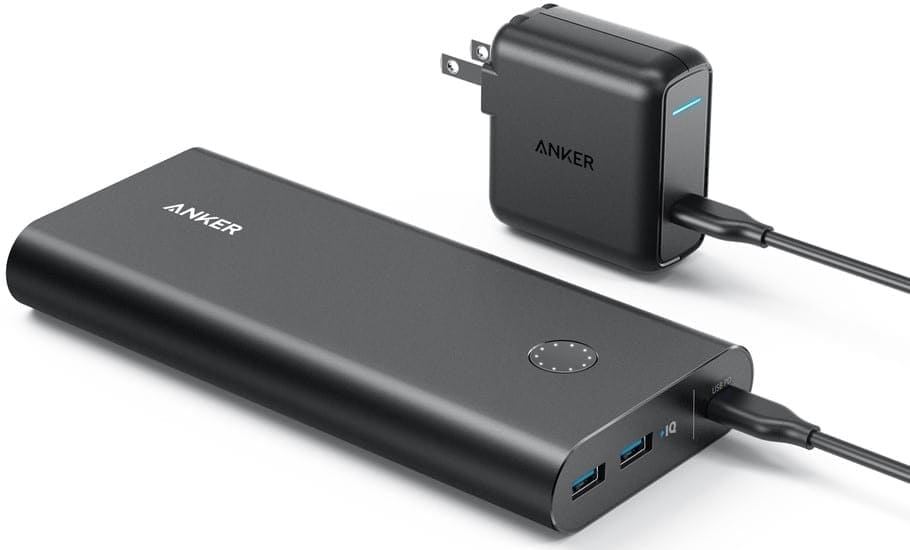
See Specification and Price Of The Anker PowerCore+ 26800 PD Power Bank

Anker PowerCore+ 26800 PD

Anker PowerCore+ 26800 PD is an upgrade of the PowerCore+ 26800 with a Power Delivery (PD) USB Type C port that recharges its internal battery three times faster. While the earlier model charges in about 11 hours, this updated PD model charges in about 4.5 hours. With a built in USB Type C port that can supply up to 30W and a backup capacity of 26800 mAh, the Anker PowerCore+ 26800 PD can comfortably charge your USB Type C laptops.


Anker PowerCore+ 26800 PD Key Specs & Features


  • One 30W USB Type C Input / output port (Power Delivery support)

  • •Fully Charges in about 4.5 hours (with included USB Type C wall charger)

  • •Two USB 5V / 3V output ports (PowerIQ fast charging Tech)

  • •Best Portable Charger for the Nintendo Switch

  • •26800 mAh Capacity

  • •Fast Charging Support

  • •Stops charging when battery is full

  • •Stops when battery needs charging

  • •180 × 80 × 24 mm Dimension

  • •590 g weight


Anker PowerCore+ 26800 PD Portable Charger


The Input


The major difference between the Anker PowerCore+ 26800 PD and the earlier version is that it offers a USB Type C port. The USB Type C port is both an input and output port. You use it to recharge the portable power bank charger or you can use it to charge your USB Type C compatible devices.
As an input port, the USB Type C port can supply up to 27 watts using the included USB Type C wall charger. This fully recharges the Anker PowerCore+ 26800 PD in an impressive time of about four and a half hours. This is a lot less than the standard Anker PowerCore+ 26800 that needs about 11 hours to charge. This also beats the 6 hours charge time of theAnker PowerCore II 20000 with dual-input and a smaller 20,000 mAh capacity.

The Outputs


The USB Type C port charges the Anker PowerCore+ 26800 PD, but is also an output port for charging your USB Type C compatible devices. However, you will need to press the LED power wheel before connecting the device to activate the output feature.
As an output port, it can supply up to 30W for charging of your laptop including the latestMacBook Pro with touchbar. A couple of users have also found it handy with recharging the Nintendo Switch.
Aside, the USB Type C port, the Anker PowerCore+ 26800 PD also has two standard USB output ports rated at 5 volts / 3 Amps. The portable charger uses Anker’s proprietary PowerIQ to sense the optimal current required to charge the connected mobile device and supply just that for the fastest possible charging time.

Other Features


Anker PowerCore+ 26800 PD features the same premium design of the earlier model right down to the matte finish and LED power wheel.

Pricing and Availability


Anker PowerCore+ 26800 PD is available at leading online stores in your country. You buy the portable charger for $79.99 or 109.99 (with Anker 27W USB Type C Wall charger) in the United States. When 
available, Anker PowerCore+ 26800 price in Nigeria should range from 35,000 Naira to 50,000 Naira.
Read More »
.

Friday, 26 May 2017

See Lists of Android Phones With Good Battery Life and Features

It is a well-known fact that the most popular problem most smartphones are facing is the problem of Battery. And we all know it is not always possible to carry your phone charger about or even find a power outlet to charge your phones on the go; so what is a good way to ensure you are not always running about to charge your phone? Simply get a smartphone with great battery life and save yourself a little stress.

It is better to establish everything by buying a good phone with quality battery than to buy one with weak battery and be struggling to extend battery life.


To avoid this, read this post so you can know the phone to buy and it's battery's strength.

Tested Phones With Good Battery Life

TECNO Phantom 6 Plus

TECNO is one brand that is gradually becoming a household name in Nigeria due to the amazing devices they keep churning out; basically, it’s like every time you think they have outdone themselves, they always come up with something new to surprise you! One of their most impressive smartphones is the Phantom 6 plus – beautiful, sleek, durable and bagging a very impressive 4050 mAh battery!


Gionee A1

The Gionee A1 prides itself not only in being able to take the most awesome selfies with its professional quality camera, but also having an impressive battery life that the owner would totally enjoy. Although the Gionee A1 has a lot of important specs, it is undeniable that the 4010 mAh battery power it possesses tops our list of why you should get this phone, even top Nigerian singer Seyi Shay agrees!


Huawei Ascend Mate 700

Huawei phones are undeniably one of the most durable and rugged phones you can find in the Nigerian market. If you want a smartphone that delivers you a great user experience, won’t break at the slightest accidental slip and has a strong battery that can last you a very long time without having to be recharged, then the Huawei Ascend Mate 7 with its 4100 mAh battery is one phone you will enjoy!


Infinix Note 3

Infinix is known to be a very good brand with upgraded  battery capacity of the Note 3 to 4,500 mAh, which we believe is a very good life span for any battery.


Samsung Galaxy S7 Edge

This is also a great smartphone with good battery life and besides this, Samsung is a powerful brand.


These are good options for any smartphone lover who intends and is serious about owning a phone with good battery life.
Read More »
.

Friday, 12 May 2017

Phone Review:Oukitel K6000 Plus.First Smartphone in the World to Possess 12V/12A and Impressive Battery Capacityof 6080 mAh

We are quite aware of the fact that having a phone, not just any phone, but a standardized one, is not only based on the internet connectivity nor only based on the Camera  quality. But I am convinced that the total function of a phone,is Centered on the BATTERY. The battery of every smartphone is very important because the rate of satisfaction a phone gives you in terms of time,is dependent on the battery.  So I can say "that the battery Capacity is directly proportional to your maximum satisfaction in Galileo time provided connectivity remains constant."

This feature is indispensable in every and any smartphone because most of you tell the feeling you have when your battery runs down while you still using it for an important task. The battery in my own perspective ,could be called "The Motherboard of all Features".

Here comes an phone in the Oukitel series called Oukitel K6000 Plus. This phone is actually the predecessor or the upgraded version of the Oukitel  K6000.
As we are all aware of the fact that the Oukitel series share an amazing feature in common which is it's battery capacity.

This phone came with 6080mAh battery capacity and it is the first smartphone to possess 12V/12A and can be charged fully within 1 hour 40minutes.

In the aspect of Storage, the phone isn't that bad, it comes with 4GB RAM and 64GB internal memory storage with 256GB memory card support possessing hybrid slot. It has 16MP rear or back camera with LED flash and 8MP front-facing camera. Out of the box it runs on Android 7.0 Nougat.

Read on to see its Specifications.

Specifications and Features of The Oukitel K6000 Plus 

•ANDROID OS - Android 7.0

•Nougat DIMENSIONS - It has 155 x 76.6 x 9.6 mm and

•Weight.      207grams

•USB TYPE - MicroUSB 2.0

•OTG AUDIO PORT - 3.5mm jack

•BUILD - Metal unibody

•COLORS - Gold and Grey

DISPLAY - IPS LCD capacitive touchscreen of 16million colors

•Screen5.5-inches HD display with

•Resolution 1080 x 1920 pixels and supports multitouch.

•Protected by Asahi Dragontrail Glass.

•Rear Camera.        16MP with LED flash

•Front camera -       8MP


•SENSORS - Fingerprint (front-mounted), accelerometer, proximity and compass


•PROCESSORS - MediaTek 6750T CHIPSET, Quad-core 1.5 GHz Cortex-A53 CPU and Mali T860-MP2 GPU.


•NETWORKS - 2G, 3G and 4G enabled

•4G LTE BANDS - 1(2100), 3(1800), 7(2600), 8(900) and 20(800) MHz 4G

•LTE SPEED - Up to 150mbps

•SIM CARDS - Dual Nano-sim

•BATTERY - Non-removable Li-Ion 6080mAh battery capacity with fast charge (0 - 100% in 1 hour 40 minutes charge)

•MEMORY

•RAM.      4GB

•Storage.      64GB that can be expanded up to 256GB using a MicroSD.


PRICE - It costs 72,000naira but it's promotional sale is 56,000naira.

This is the type of phone many people have always wished for, now you have the chance to make your dreams come true. It's high you stopped nagging and complaining about your phone not lasting.

Go for Oukitel K6000 Plus
Read More »
.

Thursday, 11 May 2017

Amazing 5100mAh Fast Charge Portable Battery Pack Launched by Samsung

Samsung has launched a new 'Fast Charge Portable Battery Pack' with a 5100mAh battery. Unlike most power banks, Samsung Portable Battery Pack is compatible with USB, Micro-USB, and USB Type-C devices, which includes smartphones and tablets. The South-Korean company claims that this battery back will be sufficient for two full charges to smartphones. It is priced at $59.99 (roughly Rs. 3,870) and is available viaAmazon and Samsung online store in the US.

Samsung's battery

In addition, the Samsung Fast Charge Portable Battery Pack and the smartphone can be charged simultaneously with the 'pass-through' charging functionality. It simply means that you can plug-in and charge the battery pack while charging your smartphone through the battery pack. Talking about the design, it is rectangular in shape with an LED power indicator to show the battery power left and comes with a strap for easy portability.


The Samsung Fast Charge Portable Battery Pack is ideally suited for the company's latest smartphones - Galaxy S8 andGalaxy S8+. However, its commercial (seen below) is featuring a Samsung Galaxy S7 Edge being charged using the battery pack. It can also deliver '1.5x fast charging' on compatible devices that use Samsung Fast Charge, which includes recent Galaxy smartphones like Galaxy S6, Galaxy Note 4, and so on. Rest of the devices will be charged at regular charging speeds via USB, Micro-USB, or USB Type-C ports.
Read More »
.

Tuesday, 2 May 2017

5 Ways to Increase Battery Life and Reduce Slow Phone Charge


Most of us when we got our phones newly,we were impressed with the battery life and operations and would even boast about the battery and hours of operation to friends and family. But after a month or two,the battery no longer functions as it used to when we first got it.

Here's a similar complain we got from a friend

My Note 5 says it is going to take 6 hours to be fully charged from 10%....When I first got the phone is was charging very fast, about 20-30% up to full in a little under an hour...now I need to charge it all night.

Does anyone else have this issue or have a solution?

What causes my phone to charge slow? Is it the battery or the phone inside?????????


That was a complaint I got from a concerned phone user.Today I try my possible best to proffer a solutions. But if there are other ways not mentioned or suggested here,you are welcome to contribute via the  comment box.Thank you

How to fix a Slow Charging Smartphone


Tip#1:Don't Use Phone While Charging: Using your smartphone while charging is not an healthy move to your device. It puts a negative impact on yourAndroid’s battery life. It causes overload to the battery life thereby causing the phone to over heat

Follow these steps to Reduce Charge Time

•Close/End all the applications that are running

•Turn off WiFi, Bluetooth and GPS


Tip#2:Avoid Charging From Powerbanks, Laptops or PC: A lot of us are guilty of this crime. Irrespective of the fact that we charge our phones using any of these outlets,it isn't still a good idea to do so. USB ports on Computers are meant for transferring data, they do not have enough current for a device to charge. Hence, slow charging.
E.g Output Current of USB
  • USB 2.0 can provide up to 500mA
  • USB 3.0 can provide up to 900mA
In the absence of a charger,and decide to use a PC USB port as a last resort,it would be great if you connect your device to a USB 3.0 (blue) port.


Tip#3:Use Airplane Mode: Airplane mode on your smartphone can significantly improve the charging process by decreasing the charging time. The only disadvantage is that you would not be able to communicate with others through mobile network or internet


Tip#4: Replace Your Battery: If you’ve been using your device for more than 1 year, and it takes more than 3hours to charge and less than 5hours to discharge, then it’s time to look for a replacement.

Remember, the highest form of abnormality is for your device to be charging for more than 4hours and still doesn't get to 100% full charge.

Tip#5:Finally,Replace The Charging Cable:if you've tried the other tips mentioned above and none seem to be in your favour,replace the charging cable because oftentimes, it is usually the micro-USB to USB cable that is the culprit. These cables lose their efficiency over time and therefore can’t provide enough current to charge the phone/device. 
Change the Micro-USB to cable. Either purchase a new original one or borrow the one that’s being used on other device.


I hope this has been helpful.....if there are other questions, kindly use the comment box.Thank You
Read More »
.

Thursday, 27 April 2017

Most Powerful and Awesome Power Bank With 50,000mAh and 100,000mAh Respectively

The Chinese consumer electronics company Orico has unveiled the Orico MOUPS – it is the largest capacity power bank till date .The Orico MOUPS which in reality is more of a mobile uninterrupted power supply (UPS) gadget comes with four USB interface which makes it suitable for charging multiple devices including small capacity powerbanks .

Orico-MOUPS-power-bank


The Orico MOUPS power bank is available in two versions

• 50,000mAh capacity Orico MOUPS and

• 100,000mAh battery


General Features


•Both Powerbank have a Quick Charge 3.0 support
•maximum output power of up to 18W.


Both variants of the Orico MOUPS power bank comes with a 36W solar charging board that that acts as its power source , though it come with extra cost .

The Interior Features

Inside the Orico MOUPS Power bank are Panasonic, Samsung, and LG batteries ,

The Exterior Features

•LED lights for outdoor and indoor use ,
•DC outlets ,
•USB ports as well as a
•220VC outlet.

Prices

•50,000mAH capacity orico MOUPS is priced at 1,299 Yuan (approx $188) ,

•The 100,000mAh capacity Orico MOUPS goes for 1,999 Yuan (approx. $290)

while the 36W solar charging panel is priced at 500Yuan (approx. $72).


Read More »
.

Tuesday, 25 April 2017

5 Tips to Make Your Phone Battery Last Longer and Prevent Phone Overheating

Your smartphone operation is similar to that of the human body that responds and functions based on the nature of the environment. Your phone’s internal temperature changes based on the temperature of its environment. When your phone over heats, it can lead to  your battery draining,melt your Central Processing Unit and battery, or automatically lead to your phone shuting down forcefully. Overheating is one of the most prevalent mishap that most smartphone owners face.

Overheating doesn't just stop at ruining your smartphone battery, it will also mess up your overall smartphone experience and sensation.


phone-overheating

How to Prevent Your Phone From Overheating


Tip1:Turn off unused apps on your phone. Allowing apps you’re not using to run in the background runs battery and increases the heat on your phone.

Tip2: If you’re an Android user,to manage and enjoy your phone and a lasting battery, download cooler master.
Cooler Master is a professional temperature monitor and control app that detects and closes heavy resource consuming apps to reduce CPU usage and cools down your phone.

Tip3: Keep it in a cool place: Those of you who are usually under AC you’ll notice that your battery  last longer than when you are not under a cool atmosphere.

Tip4: Remove it from 4G or 3G only: Network is number one thing causes overheating, hence sucks your battery. Its better you set it to choose the preferred available network parameters instead of 4G or 3G only.

Tip5: If you’re an iPhone user, you can check the diagnostics section to see what apps have been crashing on your phone. Go to Settings > Privacy > Diagnostics & Usage > Diagnostics & Usage Data for a list of every situation where an app crashed.


When next you notice that your battery is draining fast or your phone overheats, please don’t put it in your deep freezer, just follow the tips above and you’ll be safe.
Read More »