Showing posts with label PC. Show all posts
.

Wednesday, 13 September 2017

Specification And Price Of Xiaomi Mi Notebook Pro Laptop; The Apple MacBook Pro Lookalike

xiaomi-mi-notebook-pro

Xiaomihas just unveiled a new monster laptop with codename Xiaomi mi Notebook Pro. The newly launched Xiaomi Mi Notebook Pro comes with a greater range of ports: two full-size USB 3.0 ports, a full-size HDMI port, an SD card reader and two USB-C ports -- with the one closest to the hinge doubling as the power socket as well. In other words, you're less likely to require a USB dock for your everyday needs on the Mi Notebook Pro, so long as you don't mind giving up the speedy Thunderbolt 3 connectivity. Xiaomi was also keen to point out the 1.5mm key travel on its backlit full-size keyboard.

Also See:Checkout Trailer, Features And Release Date Of FIFA 18.

The Mi Notebook Pro features Harman Infinity speakers, along with Dolby ATMOS support. The Mi Notebook Pro also comes with a backlit keypad, which is covered with 0.3mm concave keycaps.
xiaomi-mi-notebook-pro

The Mi Notebook Pro possess a 15.6-inch display with Corning’s Gorilla Glass 3 on top for protection, a fingerprint sensor integrated within the touchpad for faster and more secure Windows Hello log-ins, as well as a magnesium alloy frame for maximum durability.

Also See:Specifications,Pics and Price of The Xiaomi MI A1 (5X) in U.S,Euro,Nigeria and Ghana

The Mi Notebook Pro beats Intel’s brand-spanking new 8th generation Intel Core i7 processor clocked at 4GHz, discrete NVIDIA MX150 GPU and up to 16GB of RAM and 256GB of PCIe storage.

The Mi Notebook Pro will be coming in several varieties: an entry-level Core i5 variant with 8GB of RAM for $860 (N309,600), Core i7 variant with 8GB of RAM for $984 (N354,240) and the top of the line model that has 16GB of RAMthat retails for $1076 (N387,360).

xiaomi-mi-notebook-pro


Its connectivity options include Wi-Fi, 3-in-1 SD card slot, Bluetooth, and USB Type-C port. The Mi Notebook Pro’s battery promises 60Wh of power, along with support for 1C quick charge. Xiaomi claims that within 35 minutes of charge, the battery power reaches 50 percent.


Other Features 


Other goodies on the Mi Notebook Pro include a fingerprint reader (Windows Hello supported) integrated into the top-right corner of the multi-touch trackpad, a 4-cell 60Wh battery with quick charge (up to 50 percent after 35 minutes), Harman Infinity speakers, Gorilla Glass 3 on the screen and a sturdy magnesium frame inside the aluminum chassis -- which comes in at 15.9mm thick, by the way. The only letdown here is the 1080p display resolution and 72-percent NTSC gamut, neither of which sound very "pro." 

What do you think of this laptop. 


Read More »
.

Monday, 28 August 2017

Easiest Tutorial on How To Install Showbox App On Your PC

Showbox which is some people's no.1 spot forHD movies, TV shows, cartoons, Series movies and more movies. You probably have it installed on your Android phone or you have Moviebox installed on your iPhones but for PC users…
This tutorial will show you how to install Showbox on your PC.

>>Download Chrome browser on your PC if you don’t have it
>>Open the downloaded Google Chrome and download ARC Welder here
>>Press ‘Add to Chrome’
>>Click on Add App

>>Open ARC Welder
>>Hit ‘Choose‘ and select a directory or create a new one for ARC Welder (this is where the data for the installed apps are stored)
arc-welder

>>Download Showbox.apk to your computer here.
>>In ARC Welder, press ‘Add your APK‘ and add the Showbox .APK
arc-welder

>>Click on Test
arc-welder

>>Showbox will now run on your PC. (If you are getting “Connection Error: 

Check your internet connection” error, simply open new tab in Chrome > Apps > Showbox)


With this method you can also use this method to install any apk on your PC…

please don't forget to share 
Read More »
.

Monday, 24 July 2017

See Specifications, Features and Price of The Asus ZenBook 3 Deluxe Laptop

The Asus ZenBook 3 and the Asus ZenBook 3 Deluxe are essentially the same laptop, though there are still some subtle differences. The ZenBook 3 is a top-notch alternative to the 12-inch MacBook. The Deluxe version, similarly, is similar to the MacBook Pro. The ZenBook 3 Deluxe offers additional IT-friendly features in Windows 10 Pro, which power users or traditional businesses would find handy. However, most people would probably do without these extra features.

The ZenBook 3 Deluxe is what one might describe as a crossover laptop. It has pro-level features like a fingerprint reader and Windows 10 Pro. However, the typical business laptop look is overlooked, in favor of a stylish aluminum chassis and a deep blue lid with a circular brushed pattern. Considering that this is a 14-inch display laptop, the device is quite light and portable.Asus ZenBook 3 Deluxe

Also See:Cool and Awesome Phone/Pad For Game and Movie Lovers-Asus Zenpad 3 8.0 Z582KL.See Price

The ZenBook 3 Deluxe comes with a standard, non-touch 1,920×1,080-resolution screen. There is no option to upgrade to a higher version. However, this works well enough if you watch HD videos. As is the norm for Asus laptops, the speakers are not all that awesome, so you would be better off using headphones.

Just like the MacBook, the ZenBook 3 Deluxe has a backlit keyboard with island-style keys. These reach almost to the edge of the chassis. In terms of performance, the device performs excellently. Reports suggest that the ZenBook 3 Deluxe is great for web surfing, streaming HD video, basic photo and video editing and general office tasks. But then, the ZenBook 3 Deluxe has a limited set of connection options, which is quite a downer. The laptop comes with three USB-C ports, two of those being Thunderbolt 3 ports, and one headphone jack

The ZenBook 3 Deluxe averaged 7 hours and 29 minutes on battery. This is not so impressive compared to other laptos. The LG Gram has a longer battery life at 11 hours and 30 minutes, while the MacBook lasts 10 hours and 26 minutes.


All in all, the Asus ZenBook 3 Deluxe is a good enough crossover laptop with reasonable specifications. It costs $1,699.


ASUS ZENBOOK 3 DELUXE SPECIFICATIONS

•Display: 14-inch, 1,920×1,080 display

•CPU: 2.7GHz Intel Core i7-7500U

•Memory: 16GB DDR3 SDRAM 2,133MHz

•Graphics: 128MB dedicated Intel HD Graphics 620

•Storage: 512 GB SSD

•Networking: 802.11ac, Wi-Fi, IEEE 802.11 a/b/g/n, Bluetooth 4.1

•Operating System: Microsoft Windows 10 Professional x64

What do you think of this Laptop's features?

Read More »
.

Friday, 21 July 2017

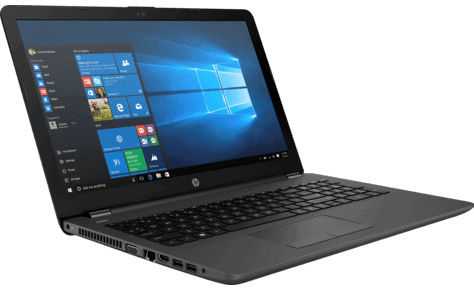
See Specifications and Design Of The HP 255 G6 Laptop tagged "Durable Mobile Design"

Parading what its maker calls “durable mobile design,” the HP 255 G6 is a cost-effective notebook that promises respectable performance. It comes equipped with 7th generation AMD APUs, sizeable display and other standard features.

HP 255 G6 Key Features and Specs


  • 7th Generation AMD A6 APU or AMD E2 APU Processor
  • AMD Radeon R4 or AMD Radeon R2 Graphics
  • Windows 10 Home, Windows 10 Pro, FreeDOS 2.0
  • 15.6-inch LED Display
  • 2GB, 4GB, 8GB RAM (up to 8GB RAM in two slots)
  • 500GB HDD (7200 rpm), up to 1TB HDD (5400 rpm), up to 256GB SDD
  • Up to 7 hours, 30 minutes Battery Life


HP 255 G6

Build and Screen


HP says it built this one for those who love to work on the go. The company describes the design as durable and mobile. But it’s anybody’s guess if it’s truly that. At about 24 millimetres in thickness, the HP 255 G6 isn’t that slim. But the weight is decent, starting at 1.86 kg.
The HP 255 G6 sure makes the cut if you’re in the market for a laptop that offers a sizeable display. You get a 15.6-inch diagonal display with anti-glare feature. The screen comes with either HD or Full HD resolution.

Power and performance


As for the innards, the HP 255 G6 features seventh generation Accelerated Processing Unit (AMD). The processors, which belong to the A6 and E2 families, receive support from up to 8 GB of DDR4 RAM.
Integrated AMD Radeon R4 or R2 takes care of graphics, depending on processor choice. HP says you should expect the notebook to last almost a full day at work – seven and half hours. This promises decent performance, although nothing out of the world.

Other Features


The HP G55 G6 as expected boots Windows 10 operating system (Home or Pro). You also have the option of FreeDOS 2.0. For storage, there is SATA hard (5400 rpm or 7200 rpm) and M.2. SATA SSD to choose from. Among the port options on offering are two USB 3.1 Gen 1 ports, an HDMI 1.4b port and a VGA port. There is also a multi-format memory card reader onboard.
With a full-size island-style keyboard featuring numeric pad, the HP 255 G6 laptop is ideal for business users on budget. The touchpad has multi-touch gestures enabled. Trusted Platform Module (TPM) 2.0 adds an extra layer of security. For online collaboration, you get a VGA or HD camera along with a pair of integrated stereo speakers.

Pricing and availability

HP 255 G6 affordable business laptops are not yet available on in Nigeria, Kenya, or Ghana. The HP 255 G6 price in Nigeria is expected to start at around 95,000 Naira, depending on your location and the configuration of the laptop.
Price in Ghana is expected to start at around GH₵ 1100. HP 255 G6 price in Kenya starts at 25,999 KSh.

HP 255 G6 Specs

Here are a few specs of the HP 255 G6 Notebook:

General Features

  • OS: Windows 10, Windows 10 Pro, FreeDOS 2.0)
  • Processor: 7th Generation AMD A6 APU or AMD E2 APU Processor
  • GPU: AMD Radeon R4 or AMD Radeon R2
  • Memory: 2GB RAM, 4GB, 6GB, up to 8GB RAM
  • Colours: Charcoal Black
  • Dimension: 38 x 25.38 x 2.38 cm
  • Weight: starting at 1.86 kg

Display & Keyboard

  • Display: 15.6-inch back-lit LED Display, 1366 x 768 pixels or 1920 x 1080 pixels, anti-glare
  • Keyboard: Full-sized keyboard with numeric keypad
  • Pointing Device: Touchpad with multi-touch gestures enabled

Storage


  • Built-in Storage: up to 1TB hard drive, up to 256GB SDD
  • Optical Storage: DVD Writer (optional)
  • Bundled Cloud Storage: –

Ports & Connectivity


  • Webcam: Yes, VGA Webcam
  • USB Ports: Yes, 2 x USB 3.1, 1 x USB 2.0
  • HDMI: Yes, 1 port
  • VGA: Yes, 1 port
  • Ethernet (RJ-45): Yes, 1 port
  • SD Slot: Yes, 1 slot
  • Mic/Headphone: Yes
  • WLAN: Yes, Wi-Fi 802.11 a/b/g/n/ac, Dual-Band
  • Bluetooth: Yes, Bluetooth 4.2 (optional)

Other Features


  • 2 integrated stereo speakers
  • TPM 2.0

Battery


  • Battery: 3-cell, 31 WHr or 4 cell, 41 WHr Li-ion Battery
  • Use Time: up to 7 hours, 30 minutes


What do you think of this laptop's life?
Read More »
.

Thursday, 20 July 2017

See Best Tips On How To Prevent Your Laptops and Computers From Theft

Laptops and computers have contributed a lot in our day to day life. The importance of laptops and computer cannot be overemphasized so I won't even be going into the importance right now. But most times our laptops get stolen and believe me when I say it that I have been there. So today I'll be showing you how to prevent this mishap from happening 

Most times, it doesn't even bother the victim of theft that his or her laptop has been stolen. The area where most people are emotionally affected is in the aspect of regaining back his/her data and information on it. I will be showing you some well researched way on how to prevent your Laptop from theft and also how to retrieve all your information as well.


Some Tips And Ways To Prevent Laptop From Theft


=> Install tracking and recovery software: Tracking and recovery software helps track laptop,computers if they are stolen and it recovers any stored information. Depending on the software, it could protect your laptop in any number of ways. It could activate a GPS locator once you report your laptop stolen. It could pinpoint the IP address where your laptop was last used to find its location. Some software programs laptops with built-in webcams to take snapshots of the thief and email the information to the police.


=> Place an ID Tag on your laptops: Laptops are so portable, they’re easy to misplace. Most people who find lost items are honest enough to return these items. Having ID Tags with the contact information on the laptop actually encourages people to return them. Instead of placing your own information; which also places you at risk, you could hire a recovery service instead.

Recovery services place ID Tags with their address on the laptop, instead of your address. In order to protect your identity, laptop computers are returned to them and they will in turn return your laptop to you. And further to encourage people to return lost, missing or stolen laptops, they’ll even offer cash rewards. For a nominal fee, you’ll be able they tag your laptop with a tamper-proof ID that also makes your laptop harder to sell on.

=> Regular back-up and encryption: In order to protect any sensitive information on laptop computers, always remember to keep a back-up file and to encrypt any important files. That way, even if your laptop gets stolen, you’ll still have your information and the thieves won’t be able to access it.


Above all,Avoid leaving laptop computers unattended. Avoid showing off your notebook in public places. And when carrying your laptop in a public place, use a discrete laptop bag. There are plenty of laptop bags out there that look like regular bags, in order to avoid catching the eye of thieves. Always be aware where you leave your things and if you ever do need to leave your laptop, leave it in a safe place under lock and key.

Don't forget to share with friends so as to avoid theft
Read More »